
Handoff Documentation Developers Actually Use: The One-Page Component Contract
Most handoff docs go unread. Learn the one-page component contract: five sections that give developers what they need and keep design and code in sync.
A designer spends days on a spec. It has annotated screens, redlines, a long description. A developer opens it, scrolls for a minute, and then asks in chat: "What happens when the list is empty?" The document existed. It just did not answer the question.
Most handoff documentation fails for this reason. It describes what the design looks like, when developers need to know what the component does, and what to do when reality differs from the mockup. Visuals are the easy part to hand over. Behavior and intent are where builds drift.
Why long specs go unread
Long specs are written once and read rarely. They also decay. When a component changes in Figma but the document does not, developers learn that the document cannot be trusted, and stop opening it. Trust is the real asset in documentation, and it is lost faster than it is built.
Two design choices follow from that. Keep each document short enough that updating it is a five-minute job, and keep it close to the thing it describes, ideally linked from the component in Figma and from the code. Figma's Dev Mode and similar tools help here, since they expose measurements and tokens directly, but they do not capture intent. That part still has to be written by a person.
The one-page component contract
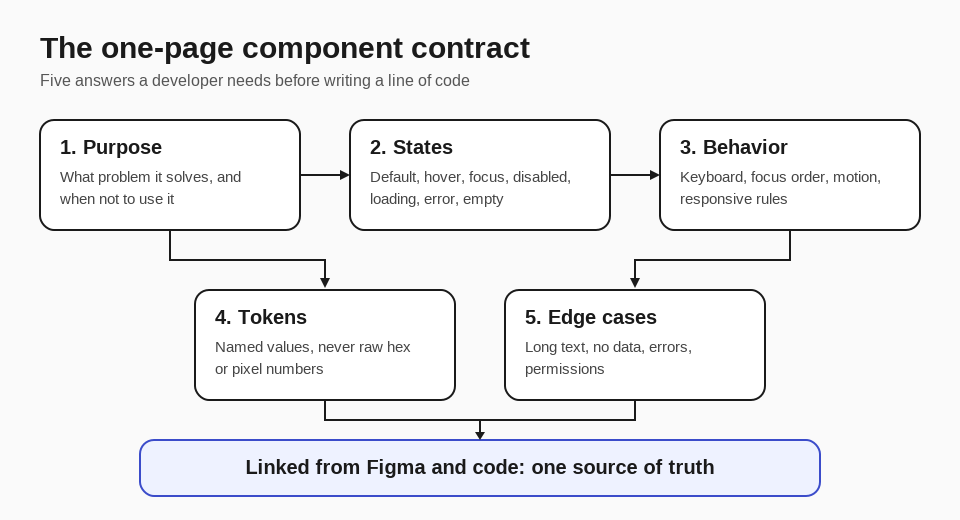
Think of the documentation for each component as a contract between design and engineering. It has five sections, and each answers a question a developer will otherwise ask you.
1. Purpose. One or two sentences on the problem the component solves, and when not to use it. "Use a toast for confirmation of a completed action. Do not use it for errors that need a decision." This prevents the most expensive mistake, which is using the right component for the wrong job.
2. States. List every state: default, hover, focus, active, disabled, loading, error, empty. Empty and error states are the ones most often missing from designs and most often hit by users, so they deserve explicit frames rather than a note saying "handle errors."
3. Behavior. Keyboard interaction, focus order, what is announced to screen readers, how it responds at narrower widths, and any motion with its purpose. If the component animates, say why, and say what happens for people who prefer reduced motion. Accessibility belongs here as behavior, not as a separate checklist nobody reads.
4. Tokens. Reference named design tokens for color, spacing, type, and radius rather than raw values. A developer who sees color.feedback.error can use the same token in code and will inherit future changes. A developer who sees a hex value will hardcode it.
5. Edge cases. What happens with a very long label, a missing image, a slow response, a user without permission, or a translation that runs much longer than the English? You will not predict all of them, but listing three or four real ones sets the standard for how the team thinks about the rest.
Keeping it a single source of truth
The contract only works if there is one canonical copy. Put it where the component lives, and link to it from everywhere else instead of pasting it elsewhere. A link cannot go stale in the way a copy does.
Version history matters too. A short changelog line at the bottom, such as the date, what changed, and why, saves developers from reverse engineering the difference between two screenshots. Use Figma's version naming for meaningful milestones, and record the reason, since the reason is what a future teammate will need.
A practical way to start
Do not retrofit your whole library. Pick the three components that generate the most questions in chat or code review, write their contracts, and ask the developers who use them what is still missing. Their questions are your template. After a month, you will have a format your team has shaped, which is far more likely to be used than one imposed on them.
If you use AI tools to draft first versions from your Figma files, treat the output as a starting point. They can describe what is visible, but they cannot know your intent, so purpose and edge cases still need a human.
The takeaway
Good handoff documentation is not thorough, it is useful. If a developer can answer "what is it for, what states does it have, how does it behave, which tokens does it use, and what breaks it" in one page, they will keep opening it. And a document that gets opened is the only kind that keeps design and code aligned.
Sources consulted: Figma, "How Figma uses Dev Mode to ship high quality features, faster" (figma.com/best-practices/how-figma-uses-dev-mode/). Recommendations are the author's synthesis of common practice; no statistics are claimed.